Showing posts with label mobile. Show all posts

HOW TO MOUNT / CONNECT USB OTG FOR EVERY ANDROID PHONE

HOW TO MOUNT / CONNECT USB OTG FOR EVERY ANDROID PHONE

HOW TO MOUNT / CONNECT OTG TO ANY ANDROID DEVICE


This may be the ultimate guide to mount memory or game pad via OTG for any android device.

What you have to know is OTG is a hard dependent, some android devices tho high end might not be OTG hardware capable.
You can google search you model to check or just try this out, if you follow it tut correctly you might find out if you device is capable or not.

This tut needs root (not that some devices would not prompt that it has otg connect but will still mount so once you connect and mount an otg drive check with your file manager or try using ES FILE manager.) and some users with CUSTOM RECOVERY can try the second tut for more easy controlling.

TUT 1:
This tut is in the video above.

Things needed: Good Root access, USB HOST CONTROLLER, your OTG CABLE & USB DRIVE or OTG DRIVE. Note that some huge sized drives might not show because of the complexity and time to process the files on the drive.


1. Open USB Host Controller
2. Connect OTG  with the drive in it.
3. Tap on the USB tab in USB HOST CONTROLLER.
4. If the drive has not show tap on refresh. Tap on the mount and choose mount location.]
5. With Root Explorer or any file manager which can access root, navigate/move to the chosen location on your sd to view and edit the files on the flash drive.


TUT 2:
 This tut need custom recovery and this zip file which will be flashed to enable OTG, and this app. Root is still needed.
OTG ENABLE was made to work for CM12 but worked on the rom I am using so try, You might work for you too. All CM 12 base Rom users are also encouraged to try this method.

Do not forget to backup your Rom before trying this method.

Download USB OTG HELPER and OTG ENABLE OPTIONS. OTG helper is also on PlayStore.
 Install USB OTG helper, open and give it root access.
 Copy OTG ENABLE OPETIONS ZIP to the root of SD
Boot to recovery MOD and flash the zip from sd
Boot Your device and connect OTG
USB OTG helper should pop up asking to open the drive
open and mount
Go to root/storage and open the drive there.

NB: This method this good because after flashing it you can connect game pad and and mouse to your phone.

CREADIT:
IYKE of www.droidpeepz.xyz
Sparrow of sparrowpaul.xyz
Maker of CM-12-OTG enable options
and makers of all the various apps

DISCLAIMER:    FOLLOW THIS TUTORIAL AT YOUR OWN RISK, I AM NOT TO BE HELD RESPONSIBLE FOR ANY FORM OF DAMAGE. KINDLY READ THE DISCLAIMER PAGE TO KNOW ALL DISCLAIMER OF THIS SITE.
Read More

SPECIAL EMOJI FOR MODDERS

SPECIAL EMOJI FOR MODDERS

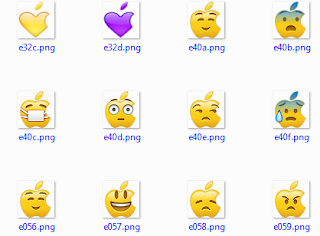
RARE EMOJI FOR ANDROID APP MODDERS


 These are some emoji for extracted (some were resized) from Cydia emoji for jailbreak iPhone users.
The emojis look good and are rare since most modders do not have to add to their Modded apps. They can also be used by genuine app makers as to give a different emoji feel to users.
NOTE: ALL DOWNLOAD LINKS ARE FROM HELPFULLINKZ.


                                                                 TMNT EMOJI

                                                                  GLOW                                                            


                                                                    SQUARE


                                                                         SPIDER MAN EMOJI


Download all the emoji together HERE.

Credits:
Have fun and Don't forget to share!

Kindly read Disclaimer page

Read More

HOW TO INSTALL MULTIPLE WHATSAPPS, INSTAGRAM, AND FACEBOOK ON ONE IPHONE WITHOUT JAIL BREAKING

HOW TO INSTALL MULTIPLE WHATSAPPS, INSTAGRAM, AND FACEBOOK ON ONE IPHONE WITHOUT JAIL BREAKING

HOW TO INSTALL MULTIPLE WHATSAPP, INSTAGRAM, AND FACEBOOK ON ONE IPHONE


In this fast world having multiple accounts of different social media is now on the trend since one does not need multiple devices to have keep on those accounts running.
The Tutorial below is for installing multiple Whatsapp, Instagram, and Facebook on your Iphone without Jail breaking it.

Just follow these simple steps:

  1. Go to settings > general > date&time ... Off set automatically.   
  
2.  Now go to the following links to download the various social media.

 WHATSAPP:
INSTAGRAM:
FACEBOOK:
BBM
MOVIE BOX
3.  Install the desire file(s) you have downloaded.

4. After installation, open app and hit "Trust".


Kindly Read disclaimer and note that the original apps are 1 hence giving digits to the others.

Have Fun and Share.

Follow Us on Fb
Read More

HOW TO GET UK (FAKE/ORIGINAL) ANYWHERE FOR WHATSAPP

HOW TO GET UK (FAKE/ORIGINAL) ANYWHERE FOR WHATSAPP

HOW TO GET UNITED KINGDOM (UK) NUMBER ANYWHERE FOR WHATSAPP OR PERSONAL USE


This tutorial is going to show how to get free UK number anywhere in the world No mobile app needed.

First visit HERE or HERE

Also: HOW TO GET FREE USA NUMBER EVERYWHERE

Select your country

Insert Your number without the country code.

Click on get Number

Fill form and receive your number in an email with pin.


Check you email for your new number. This is a forwarding system so all calls to the UK number comes to your Destination number(the number you registered with).

Also:  HOW TO INSTALL MULTIPLE WHATSAPP ON ONE DEVICE

Now register Whatsapp with this new number and wait for the call, input the code for Whatsapp and have fun.

Have fun and share...

Kindly Like this Page to get more.

Read More

HOW TO ROOT WINDOWS PHONE : WINDOWS INTERNALS 1.0

HOW TO ROOT WINDOWS PHONE : WINDOWS INTERNALS 1.0

HOW TO ROOT WINDOWS PHONE


Windows phone just got exciting with a means of Rooting. This will in no doubt bring down the security ranking of windows phones and will also bring more fun to Windows Phone; I better buy one.

I have not tried it so will post video from developer and will bring my own video later when I try it.
Get you hands dirty and be the first of your friends to root your Windows Phone.

Download this WINDOWS INTERNALS

This is the software used for Rooting Windows Phone;

Keep in mind to read Disclaimer of this Blog and the Developer Disclaimer.

Big Thanks to HeathCliff47 for making this happen.

For now there is a limited Models that this software can root and also depends on firmware version you Windows Phone is Running on.
Read More
.